hard-coding 을 통해서 모든 값들을 static 하게 app 에 사용하는 것은 매우 유연하지 못하다. 따라서 app 을 configurable 하게 만들 필요가 있다.
이때, application.properties 파일에서 custom properties 를 정의할 수 있다. 이렇게 만들어진 properties 들은 @Value annotation 을 사용하여 app 에서 해당 데이터를 접근 가능하게 만들 수 있다. 앞서 Application Properties 에 대하여 설명한 것처럼 말이다.
Spring Boot Properties
application.properties 를 통하여 Spring Boot 설정도 구성할 수 있다. Server Port, Context Path, Actuator, Security 등을 설정할 수 있다.
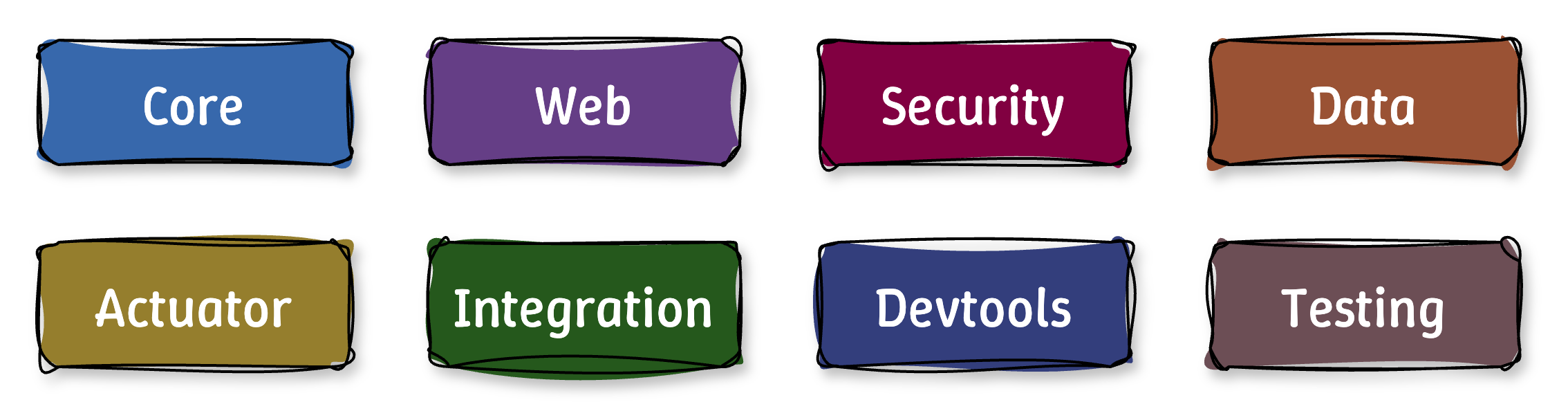
모든 Spring Boot Properties 는 Spring Boot Properties 문서 에서 확인할 수 있는데, 1000개가 넘기 때문에 property 를 선택함에 있어서 어려움이 있을 수 있다. 그러나 위와 같이 8개의 그룹으로 rough 하게 분류되어 있기 때문에, 필요한 그룹에 대하여 분석하고 필요한 property 를 선택하면 된다.
여러개의 group 중에서 몇 개만 살펴보자.
Core Properties
# Log levels serverity mapping
logging.level.org.springframework=DEBUG
logging.level.org.hibernate=TRACE
logging.level.com.lucvs=INFO

# Log file name
logging.file.name=sample.log
logging.file.path=/sample
Core Properties 에서는 Spring Boot 의 실행 환경, logging, message 처리, thread 관리 등 핵심적인 기능을 구성하는 데에 활용된다.
예를 들어 logging 의 경우 logging level 을 위와 같이 지정할 수 있는데, TRACE, DEBUG, INFO, WARN, ERROR, FATAL, OFF 로 필요한 목적에 따라 조정할 수 있다. 저장되는 log 파일의 이름 및 경로도 명시적으로 지정할 수 있다.
Web Properties
# HTTP server port
server.port=7070

# Context path of the application
server.servlet.context-path=/sample

# Default HTTP session time out
server.servlet.session.timeout=15m
Web Properties 에서는 web application 과 관련된 설정을 담당한다.
예를 들어, 위와 같이 server 의 port 번호를 지정하거나, Context Path 를 명시적으로 변경하거나, session 의 timeout 시간은 default 인 30분에서 원하는 시간으로 바꿀 수 있다.
Actuator Properties
# Endpoints to include by name or wildcard
management.endpoints.web.exposure.include=*

# Endpoints to exclude by name or wildcard
management.endpoints.web.exposure.include=health,info

# Base path for actuator endpoints
management.endpoints.web.base-path=/actuator
Actuator Properties 에서는 Accessing Endpoints 부분에서 본 것처럼, endpoints 를 추가 및 제외하거나 Actuator endpoints 의 base path 를 지정할 수 있다.
Security Properties
# Default user name
spring.security.user.name=admin

# Password for default user
spring.security.user.password=secret
Security Properties 에서는 기본 인증 설정이나 CSRF 보호 활성화 등의 기능을 설정할 수 있다. 위의 예시에서는 default 사용자의 이름이나 비밀번호를 설정할 수 있다는 것을 보여준다. 그러나 이는 아주 기본적인 설정만 제공하기 때문에 실제 publication 단계에서는 사용을 지양하는 것이 바람직하다.
이에 단순히 properties 에서 비밀번호만 설정하는 것이 아니라, 더 나아가 DB 를 사용하여 security info 를 확인하여 사용자 인증을 진행하는 방법, 암호화된 비밀번호를 사용하는 방법 등 더 고도화된 보안 전략을 사용할 수 있다.
Data Properties
# JDBC URL of the database
spring.datasource.url=jdbc:mysql://localhost:3306/mydb

# Login username of the database
spring.datasource.username=scott

# Login password of the database
spring.datasource.password=tiger
Data Properties 에서는 Database 연결 및 데이터 처리와 관련된 설정과 관련되어 있다.
Etcetra
이외에도, Integration Properties 는 messaging 이나 외부 시스템과의 통합을 위한 기능, Devtools Properties 는 개발 환경에서 편리한 기능을 제공하는 기능, Testing Properties 는 테스트 환경에서 사용하는 기능을 담당한다.